Getting Started with Databricks Connect on AWS Using Serverless Compute
Overview

Databricks Connect lets you write PySpark code locally in VS Code and execute it remotely on Databricks — no cluster management needed when using serverless compute. This post walks through the exact steps to get it working on Windows from scratch.
Step 1: Install Python 3.12.9
Databricks Connect 16.2+ requires exactly Python 3.12 — newer versions like 3.13 or 3.14 are not yet supported. Download the Windows 64-bit installer from python.org and during install:
- ✅ Check "Add Python to PATH"
Verify:
python --version
# Python 3.12.9
Step 2: Create and Activate a Virtual Environment
Navigate to your project folder and create an isolated Python environment:
python -m venv .venv

# Activate (command prompt on Windows)
.venv\Scripts\activate.bat
You should see (.venv) appear in your terminal prompt confirming activation.
Step 3: Install Databricks Connect
Install databricks connect package. Yes—per the Databricks Connect usage requirements doc at Databricks Connect usage requirements | Databricks on AWS, Databricks Connect 17.2.x–17.3.x is the supported range for “Serverless, version 4” and it requires Python 3.12.
pip install "databricks-connect==17.3.*"
Step 4: Authenticate with Your AWS databricks Workspace
Use the Databricks CLI to authenticate and populate a named profile in ~/.databrickscfg. Here we created a profile called dev2:
databricks auth login --host https://your-workspace.cloud.databricks.com -p dev
This opens your browser for OAuth login.It writes your credentials automatically to ~/.databrickscfg:
[dev]
host                  = https://your-workspace.cloud.databricks.com
auth_type             = databricks-cli
Step 5: Run Your Script
from databricks.connect import DatabricksSession


spark = DatabricksSession.builder.profile("dev").serverless(True).getOrCreate()

# Check runtime version - serverless shows "serverless" in the version string
version = spark.sql("SELECT current_version()").collect()[0][0]
print(f"\n✅ Connected! Runtime: {version}\n")

df = spark.read.table("shipments.bronze.shipmentsdev3").limit(10)
(df.select("shipment_id", "order_id", "customer_id", "carrier", "tracking_number").show(10, truncate=False))
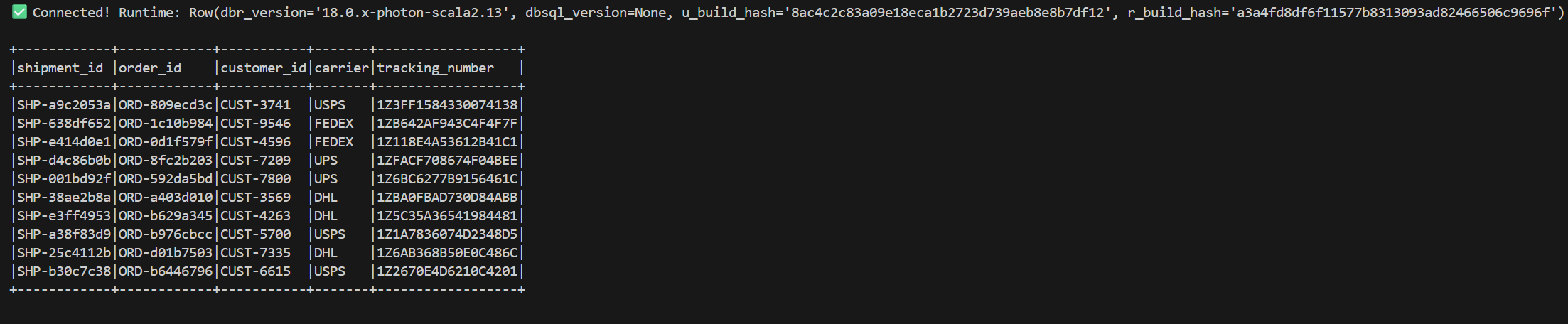
Running this produces:
How to Confirm Serverless
The runtime version string 18.0.x-photon-scala2.13 contains photon — Photon is Databricks' vectorized engine that runs automatically and exclusively on serverless compute on AWS. Classic all-purpose clusters only use Photon if manually enabled. Seeing photon in the version confirms you are on serverless.


